 Teamwise Team Admin
8. Plans Module
The Plans Module allows team admins to browse, compare, and purchase subscription plans created by Super Admin. This module provides a comprehensive interface for viewing available plans, their features, pricing, and managing subscriptions. Team admins can subscribe to new plans, upgrade/downgrade existing subscriptions, and view detailed plan information before making a purchase decision.
Core Functionality:
Plans List View:
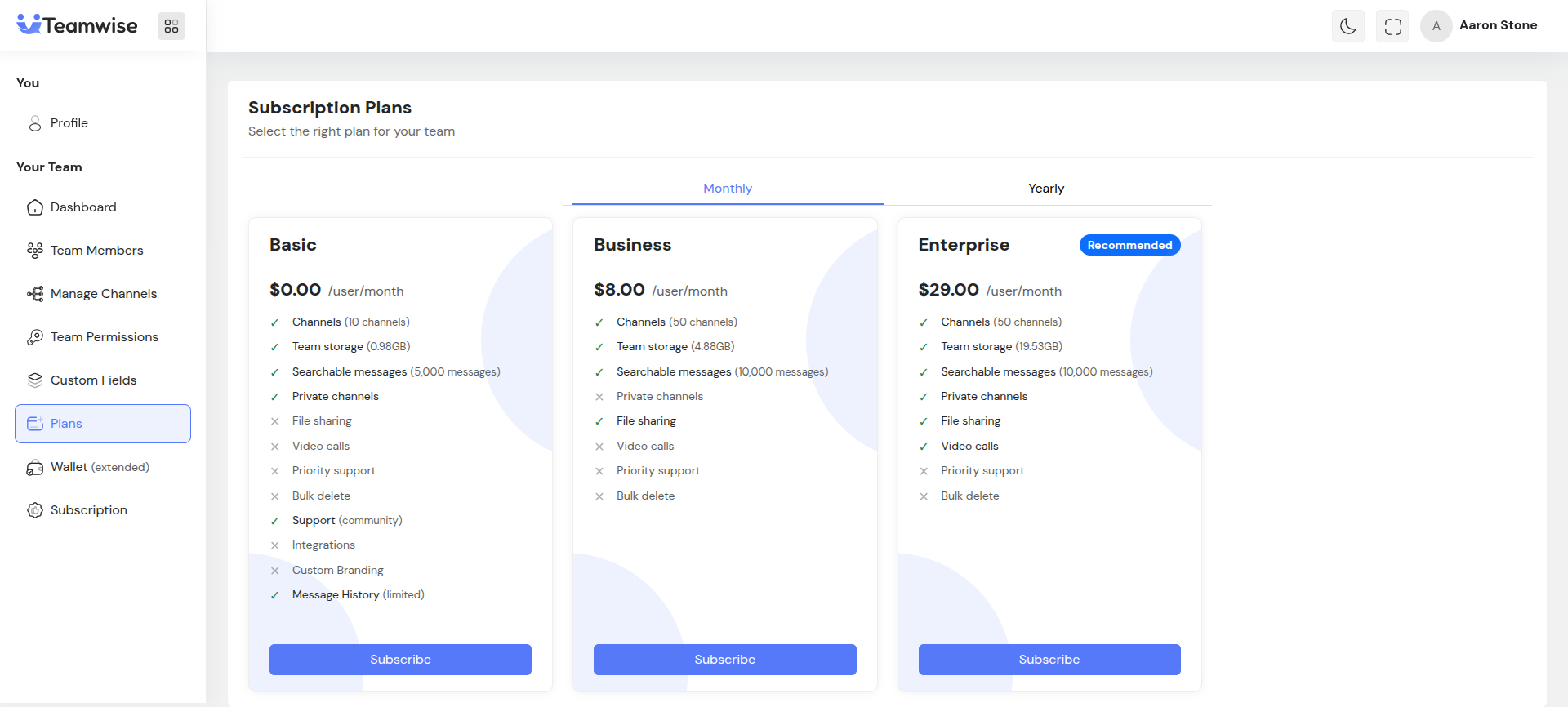
The Plans page displays all active subscription plans available for purchase. Each plan is shown as a card displaying plan name, pricing (monthly/yearly), key features, and action buttons. Plans are sorted by display order (configured by Super Admin), with default/recommended plans prominently highlighted. Team admins can toggle between monthly and yearly billing cycles to see corresponding pricing.
Current Subscription Banner:
If the team has an active subscription, a banner appears at the top showing the current plan name, expiry date, and days remaining. A "Manage Subscription" button links directly to the Subscription Management module for detailed subscription management.
Plan Card Components:
Each plan card displays comprehensive information and features:
-
- Plan Name & Description: Displays the plan name and optional description
-
- Recommended Badge: Default plans show a "Recommended" badge
-
- Pricing Display: Shows price per user per month/year based on selected billing cycle
-
- Feature List: Lists all plan features including max members allowed, max storage (or unlimited), message search limit, private channels availability, file sharing capability, video calls support, and multiple delete permission
-
- Action Buttons: Dynamic buttons based on subscription status - "Subscribe" for teams without active subscription, "Upgrade" for plans with higher pricing, "Downgrade" for plans with lower pricing, and "Subscribed" (disabled) for the currently active plan
Billing Cycle Selection:
Team admins can toggle between Monthly and Yearly billing cycles. The pricing automatically updates to show the appropriate rate. If a plan supports yearly billing but doesn't have a specific yearly price, a discount badge (typically "20% off vs monthly") is displayed to indicate savings.
Plan Subscribe Page:
When a team admin clicks "Subscribe" on a plan card, they are redirected to the detailed subscription page. This page shows:
-
- Plan Details Section: Complete plan name, description, and full feature list
-
- Subscription Summary: Side panel showing billing cycle selection (Monthly/Yearly toggle), total due today (per user pricing), and cost breakdown with calculated quote including member count (editable, defaults to current team size), price per user, total amount, subscription start date, and expiry date. A "Proceed to Payment" button is enabled when quote is calculated.
Quote Calculation:
The system automatically calculates subscription quotes in real-time as team admins adjust member count or billing cycle. A debounced API call (250ms delay) prevents excessive requests while providing responsive pricing updates. The quote includes precise costs, dates, and subscription period calculations.
Plan Change Modal (Upgrade/Downgrade):
For teams with active subscriptions, clicking "Upgrade" or "Downgrade" opens a modal showing:
-
- Plan Comparison: Current plan vs. new plan
-
- Proration Details: Shows financial adjustments including unused amount from current subscription (credit), new period cost, and charge or refund amount (net difference)
-
- Wallet Balance Impact: Displays current wallet balance, balance after change, and insufficient balance warning if wallet balance is too low
-
- Confirmation: "Confirm Change" button to finalize the plan change
Error Handling:
The module handles various error scenarios gracefully:
-
- Plan not found: Shows error message with retry option
-
- Active subscription exists: Redirects to subscription management if user tries to subscribe while already having an active subscription
-
- Network errors: Displays appropriate error messages and retry mechanisms
-
- Validation errors: Shows specific validation messages for member count, billing cycle, etc.
Key Points
-
- Plans are fetched from Super Admin's plan management system and displayed dynamically
-
- Only active plans (status: active) are shown to team admins
-
- Pricing calculations are performed server-side to ensure accuracy
-
- Plans support both monthly and yearly billing cycles (if configured by Super Admin)
-
- Member count can be adjusted during subscription to accommodate team growth
-
- Plan changes (upgrade/downgrade) include automatic proration calculations
-
- Wallet balance is checked and displayed during plan changes
-
- Default/recommended plans are visually highlighted to guide team admins
-
- All plan features are clearly listed with availability indicators (checkmarks/crosses)
-
- Real-time quote calculation provides instant pricing feedback
-
- Subscription flow prevents duplicate subscriptions and guides users appropriately
What's Next?
Let's get started — your team's new home is Teamwise Chat!


