 Teamwise Team Admin
9. Subscription Module
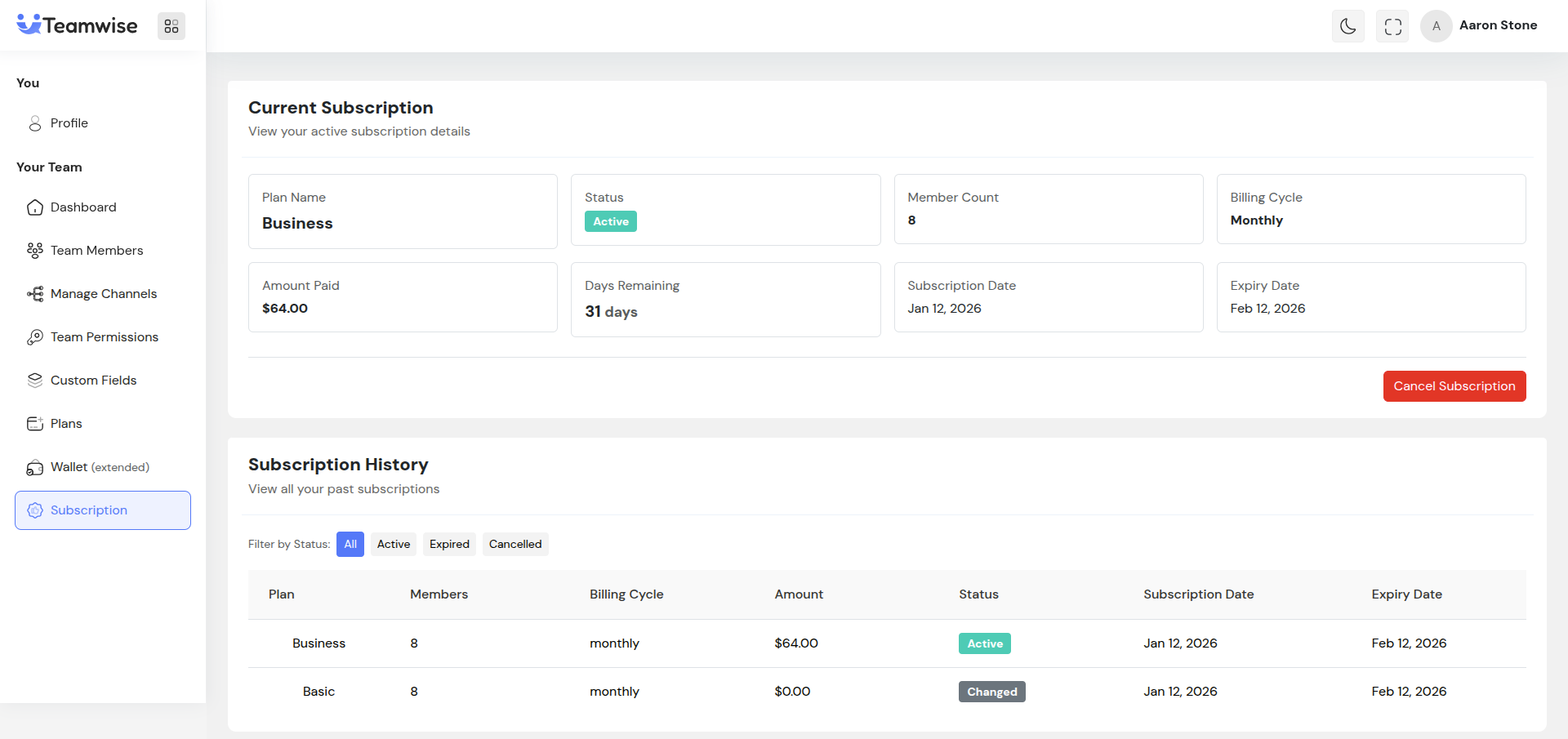
The Subscription Module provides comprehensive management of team subscription details, history, and operations. Team admins can view their current active subscription, monitor subscription details, track days remaining, and manage subscription cancellation. Additionally, the module maintains a complete history of all past subscriptions, enabling admins to review subscription changes over time.
Core Functionality:
Current Subscription Section:
The module displays detailed information about the team's current active subscription in a card-based layout. If an active subscription exists, the following information is shown:
-
- Plan Name: The name of the currently subscribed plan
-
- Status Badge: Visual indicator showing subscription status (Active, Expired, Cancelled) with color coding - Active: Green badge, Expired: Yellow/Warning badge, Cancelled: Gray/Secondary badge
-
- Member Count: Number of team members covered by the subscription
-
- Billing Cycle: Shows whether the subscription is monthly or yearly
-
- Amount Paid: Total amount paid for the current subscription period (formatted as currency)
-
- Days Remaining: Number of days until subscription expires (prominently displayed)
-
- Subscription Date: Date when the subscription was activated
-
- Expiry Date: Date when the subscription will expire
Cancel Subscription:
For active subscriptions, a "Cancel Subscription" button is displayed at the bottom of the current subscription section. When clicked:
-
- A confirmation modal appears asking the team admin to confirm the cancellation
-
- The modal clearly states that the action cannot be undone
-
- Upon confirmation, the subscription is cancelled via API call
-
- Success/error messages are displayed appropriately
-
- The subscription details are refreshed to reflect the cancellation
No Active Subscription State:
If the team doesn't have an active subscription, an informational alert is displayed informing the team admin that no active subscription exists. This state encourages team admins to browse and subscribe to available plans through the Plans Module.
Subscription History Section:
Below the current subscription section, a comprehensive history table displays all past and current subscriptions. The history table includes:
-
- Plan Column: Name of the plan for each subscription
-
- Members Column: Number of team members for each subscription period
-
- Billing Cycle Column: Monthly or yearly billing cycle used
-
- Amount Column: Total amount paid for that subscription (formatted as currency)
-
- Status Column: Status badge showing Active, Expired, or Cancelled
-
- Subscription Date Column: Date when each subscription started
-
- Expiry Date Column: Date when each subscription ended or will end
Subscription History Filtering:
Team admins can filter the subscription history by status using filter buttons:
-
- All: Shows all subscriptions regardless of status (default)
-
- Active: Shows only currently active subscriptions
-
- Expired: Shows only expired subscriptions
-
- Cancelled: Shows only cancelled subscriptions
The active filter is visually indicated with a primary color, while inactive filters use a light color. Clicking a filter button updates the table to show only subscriptions matching that status.
Pagination:
The subscription history table supports pagination for teams with extensive subscription history:
-
- Pagination controls appear at the bottom of the table when there are multiple pages
-
- Shows current page number and total pages (e.g., "Showing page 1 of 3")
-
- Previous and Next buttons allow navigation between pages
-
- Buttons are disabled appropriately when at the first or last page
-
- Default page size is 10 subscriptions per page
Loading States:
The module handles loading states gracefully:
-
- While fetching current subscription: Shows a centered spinner
-
- While fetching subscription history: Shows a centered spinner
-
- During cancellation: Shows loading state on the cancel button and modal
Error Handling:
The module handles various error scenarios:
-
- API Errors: Displays appropriate error messages when subscription data cannot be loaded
-
- Cancellation Errors: Shows specific error messages if subscription cancellation fails
-
- Empty States: Displays informative messages when no subscription history exists
Key Points
-
- Current subscription details are automatically fetched and displayed on page load
-
- Subscription status is visually indicated with color-coded badges for quick recognition
-
- Days remaining is prominently displayed to help team admins track subscription expiry
-
- Complete subscription history is maintained and accessible for record-keeping
-
- Filtering by status allows quick access to specific subscription periods
-
- Pagination ensures performance even with extensive subscription history
-
- Subscription cancellation requires explicit confirmation to prevent accidental actions
-
- All currency amounts are properly formatted according to the plan's currency
-
- Dates are formatted in a user-friendly format (e.g., "Jan 15, 2025")
-
- Real-time updates reflect subscription changes immediately after operations
-
- The module integrates seamlessly with the Plans Module for subscription management workflow
What's Next?
Let's get started — your team's new home is Teamwise Chat!


