 Teamwise Team Admin
Overview
The Team Admin panel is a powerful administrative interface that empowers team administrators with complete control over their workspace. From managing team members and organizing channels to configuring permissions and customizing user profiles, this centralized hub provides all the tools needed to effectively govern team operations, ensure proper access controls, and maintain a well-structured collaborative environment. The admin interface is thoughtfully organized into personal settings and team-wide management sections, making it intuitive for admins to navigate between individual preferences and organizational configurations.
1. Profile Management
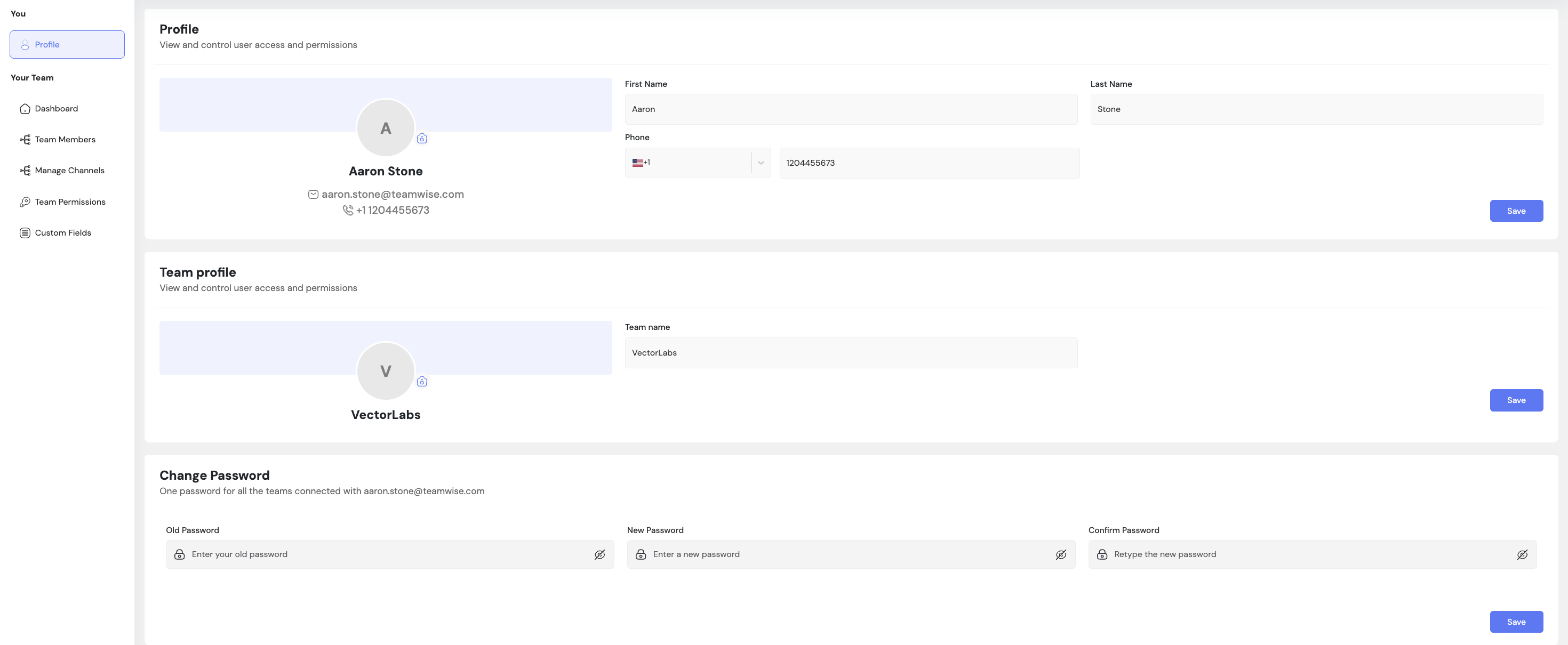
The Profile Management section allows team administrators to manage their personal account settings, team information, and security preferences in a unified interface.
Core Functionality:
Personal Profile Management:
Admins can edit their name, display name, email address, and profile picture. Updates to personal information immediately reflect across the platform wherever the admin's identity appears.
Team Information Updates:
Admins can modify team name, description, and team avatar. Changes are instantly visible to all team members, maintaining consistent team branding across the workspace.
Password Management:
Admins can update their account password by providing their current password for verification, then setting a new password that meets security requirements.
Key Points
-
- Single page interface for all profile-related settings
-
- Personal changes affect only the admin's profile visibility
-
- Team information updates are visible to all members
-
- Password changes require current password verification
-
- All updates take effect immediately upon saving
What's Next?
Let’s get started — your team’s new home is Teamwise Chat!


